AI root cause analysis that investigators actually trust.
TruStar Connect turns incident investigation into a guided, evidence-first workflow. The AI reads the documents, builds the timeline, and drafts the causal analysis. Your team confirms every fact, reads an independent bias audit, and seals a professional report. No certification course required.
- Every extracted fact confirmed by a human before it is used
- An independent AI bias audit on every single analysis
- Corrective actions ranked by the hierarchy of controls
14-day free trial. No credit card required. Data hosted in Canada.
Legacy root cause analysis was built for specialists, not sites.
Most root cause analysis software and methodologies were designed decades ago around the same assumptions: that a trained specialist runs every investigation, that evidence lives in a filing cabinet, and that the report gets written by hand at the end. In practice that means expensive certification courses before anyone can start, investigations that stall while the one trained person is busy, timelines rebuilt from memory, and corrective actions that default to retraining the worker. The TruStar Method was built by a practicing Canadian safety professional to fix exactly those failures.
Evidence first, framework second
The AI extracts the facts from your documents before offering any causal hypothesis, so the analysis is never biased by a category chosen too early.
A human checkpoint, by design
Every extracted field is confirmed by a person before the analysis uses it. The AI accelerates the work. Your team owns the conclusions.
An AI that audits the AI
An independent bias audit reviews every analysis for hindsight bias, individual blame framing, and premature closure, and you read it before sign-off.
Traceable reasoning
Every causal factor cites the timeline events and documents behind it. Anyone reviewing the report can follow the chain from conclusion back to evidence.
The TruStar Method: five Stars, one honest answer.
Every investigation examines the incident through five Stars. The analysis never stops at the person closest to the incident, because the person closest to the incident is almost never the whole story.
Star 1
People
Why a reasonable, competent person did what made sense to them in the moment. This is where the analysis starts, never where it ends.
Star 2
Conditions
The physical and environmental reality: equipment, layout, ground, weather, lighting, and ergonomics at the time of the incident.
Star 3
Systems
The procedures, training, JSAs, and permits meant to guide the work, and the gap between what the documents say and what crews actually do.
Star 4
Leadership
The organizational signals about what really matters: schedule pressure, resourcing, and how past concerns were received. The star most often missing from traditional investigations.
Star 5
Defenses
The barriers that were supposed to catch the problem and did not, inspired by the Swiss cheese model of layered protection.
How it works
From evidence to sealed report, in seven guided steps.
This is a sample investigation that illustrates every step in the process, screen by screen. The AI does the reading, sorting, and drafting. Your team confirms the facts and owns the conclusions.
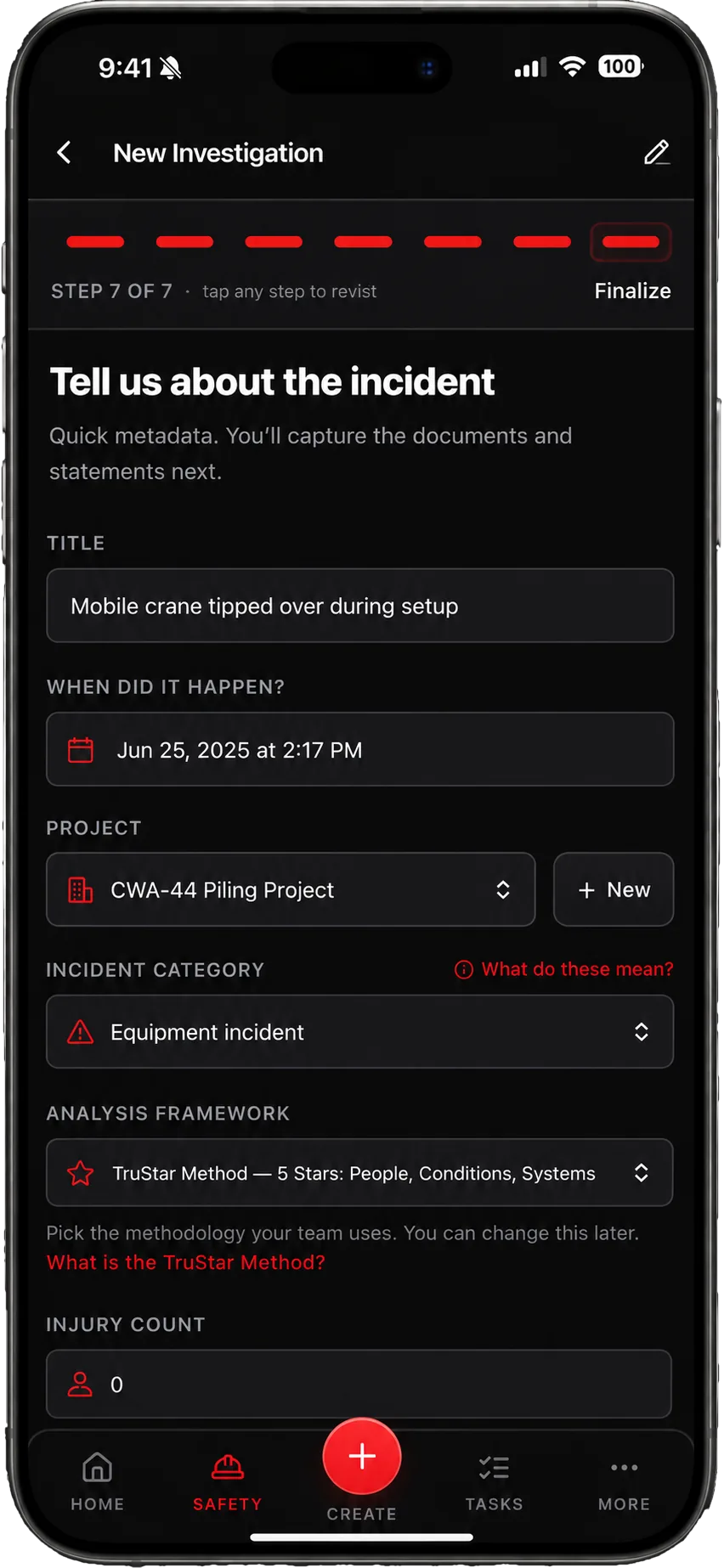
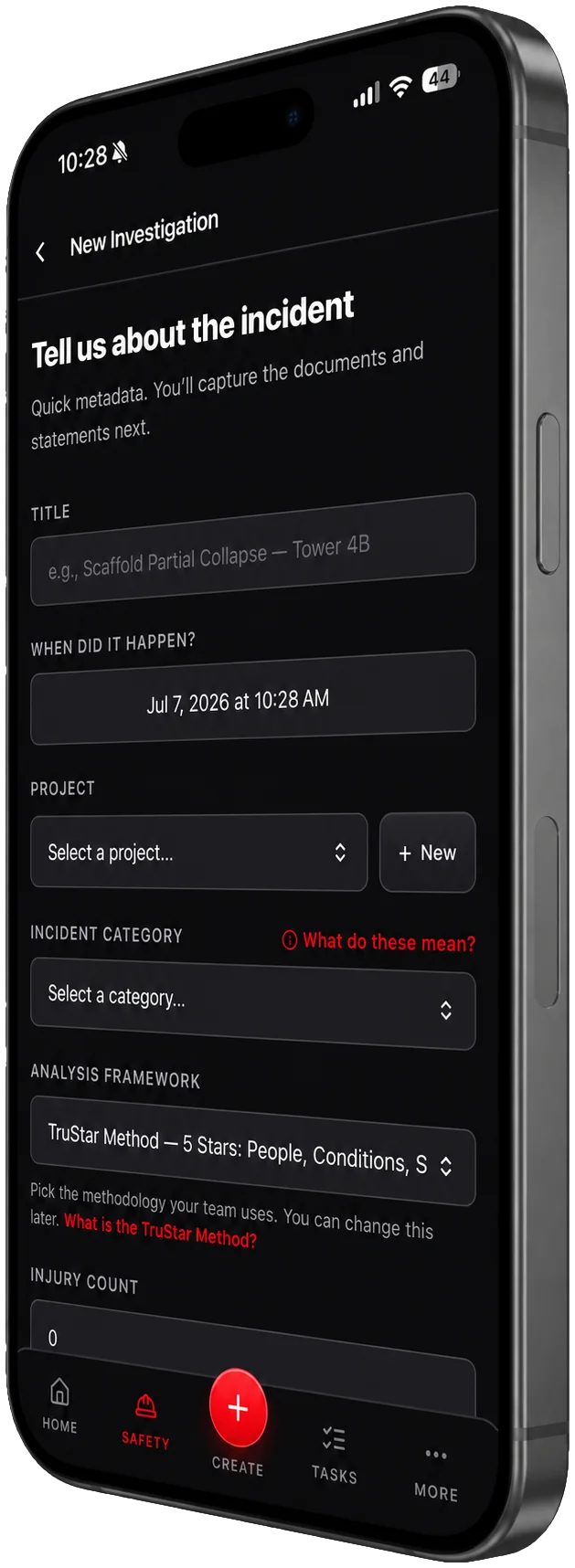
Set up · Start in minutes
Open an investigation, not a manual.
Give the incident a title, a time, a project, and a category. Pick the analysis framework your team uses, with the TruStar Method as the default. There is no certification course standing between your team and their first investigation.
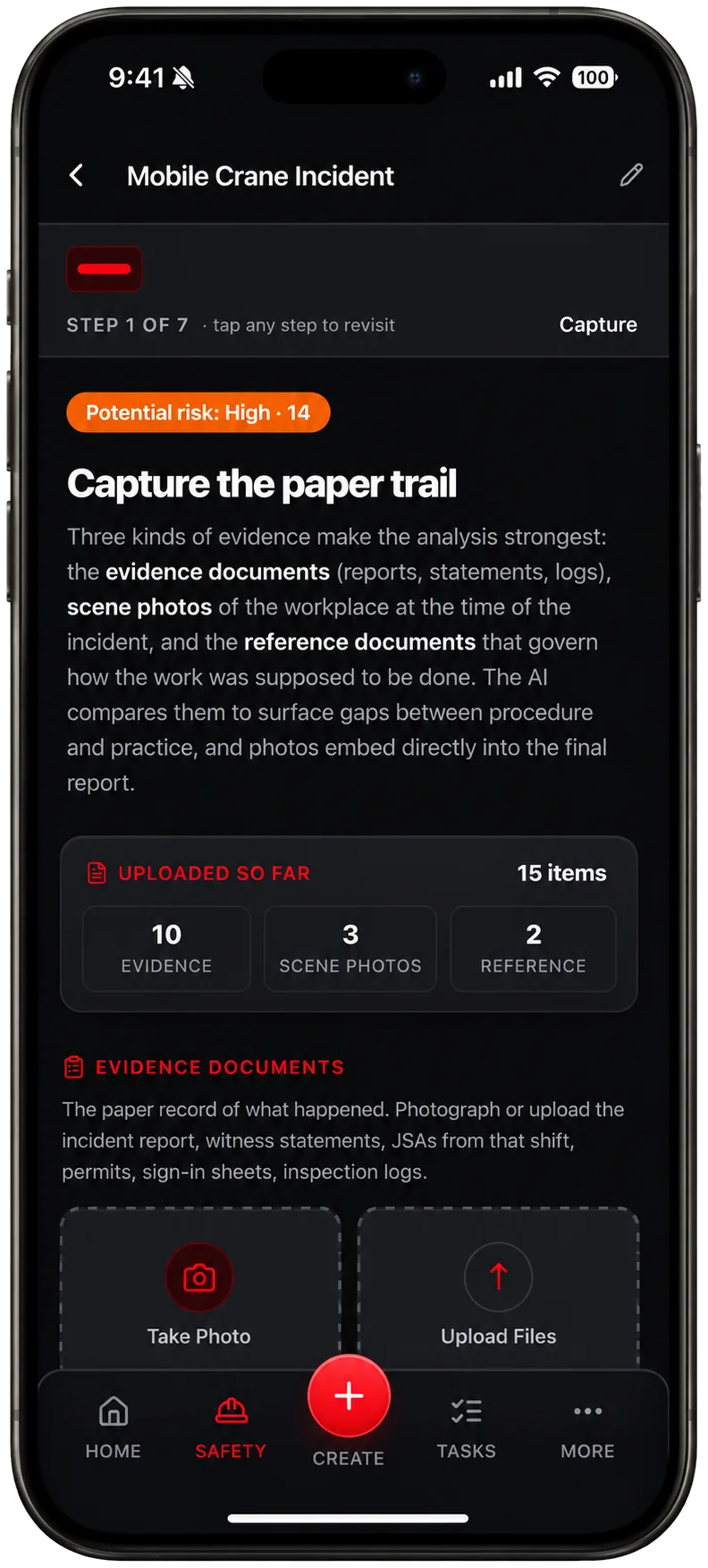
Step 1 · Capture
Capture the paper trail.
Three kinds of evidence make an analysis strong: the evidence documents that record what happened, scene photos of the workplace, and the reference documents that govern how the work was supposed to be done. The AI compares them to surface the gaps between procedure and practice.
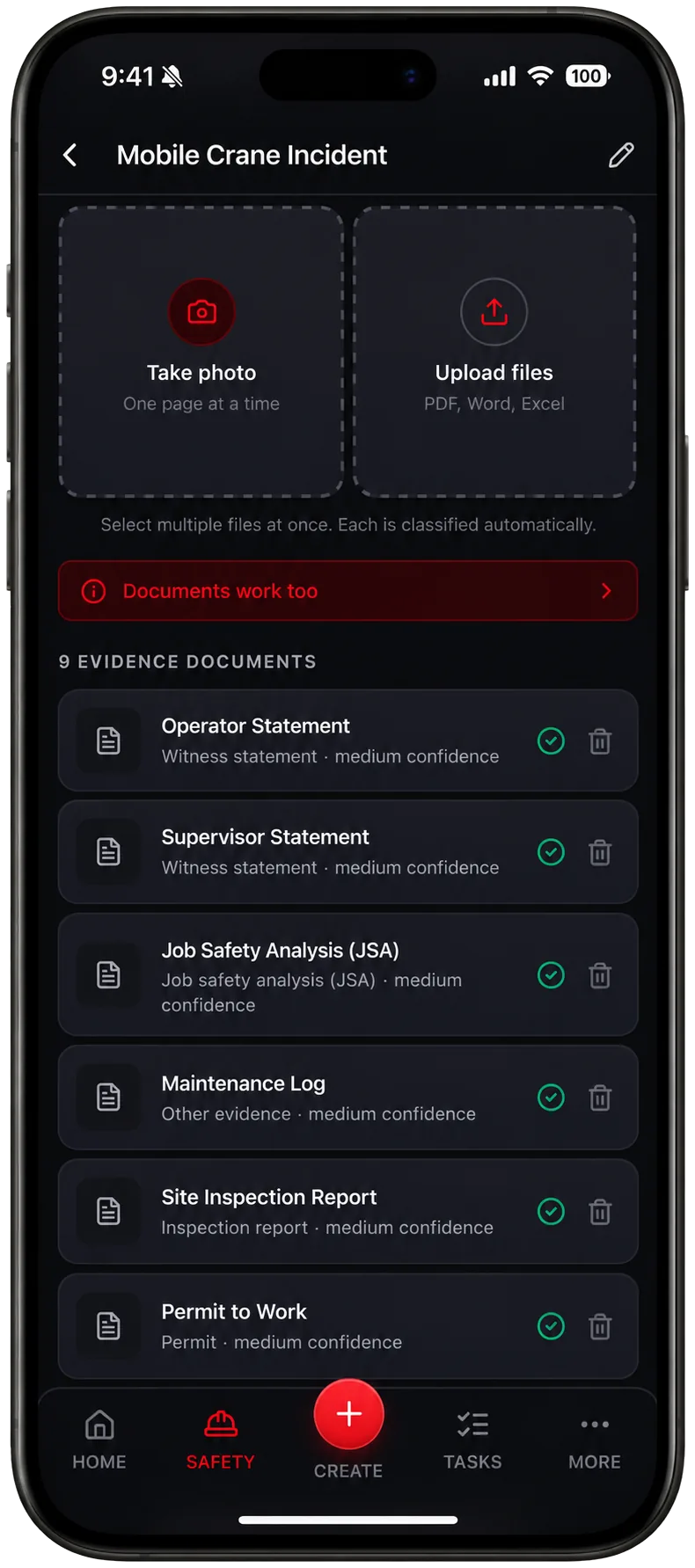
Step 1 · Auto-classification
Photograph it. The AI files it.
Photograph paper records one page at a time or upload PDF, Word, and Excel files in batches. Each document is classified automatically: witness statement, JSA, inspection report, permit, maintenance log. No renaming, no folder gymnastics.
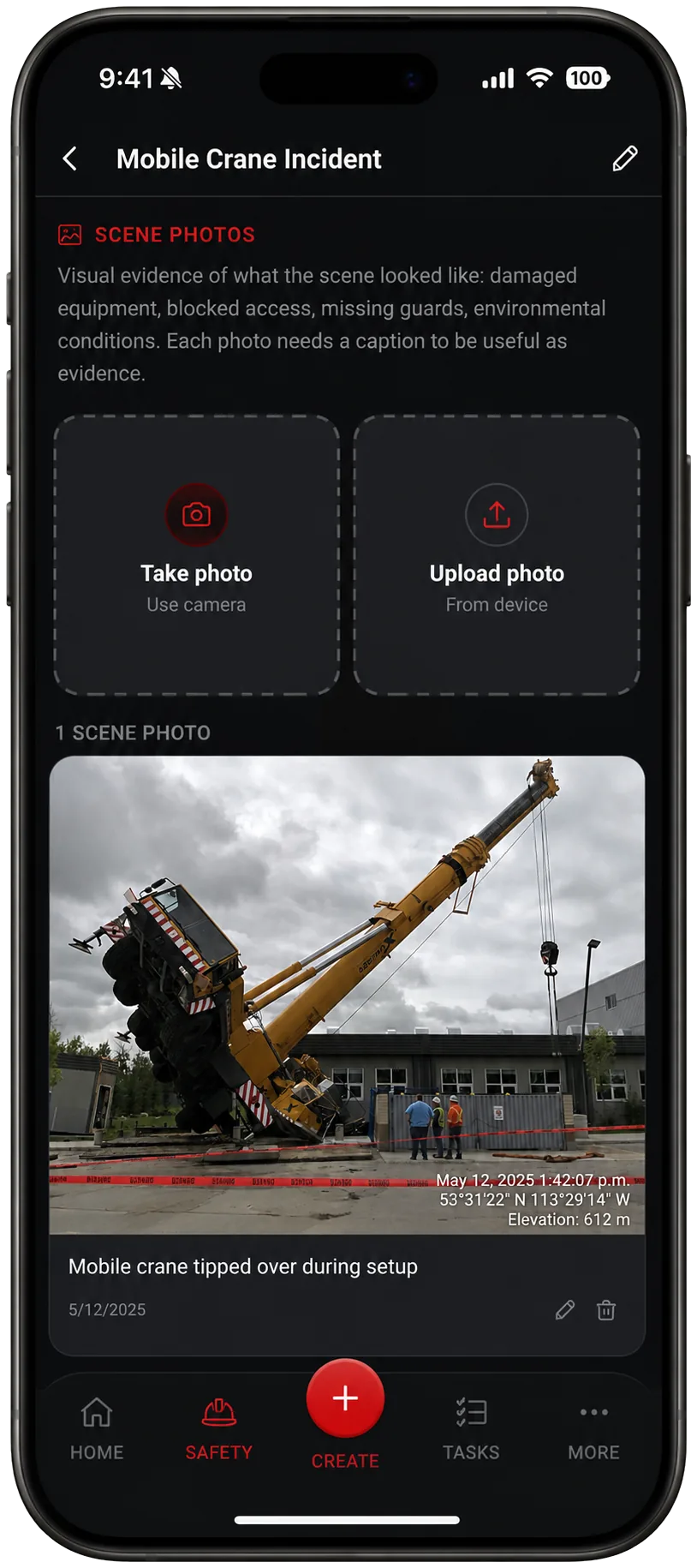
Step 1 · Scene photos
Photos that hold up as evidence.
Scene photos carry a timestamp, GPS coordinates, and elevation, and each one takes a caption so it is useful as evidence. Photos embed directly into the final report instead of living in a camera roll nobody can find later.
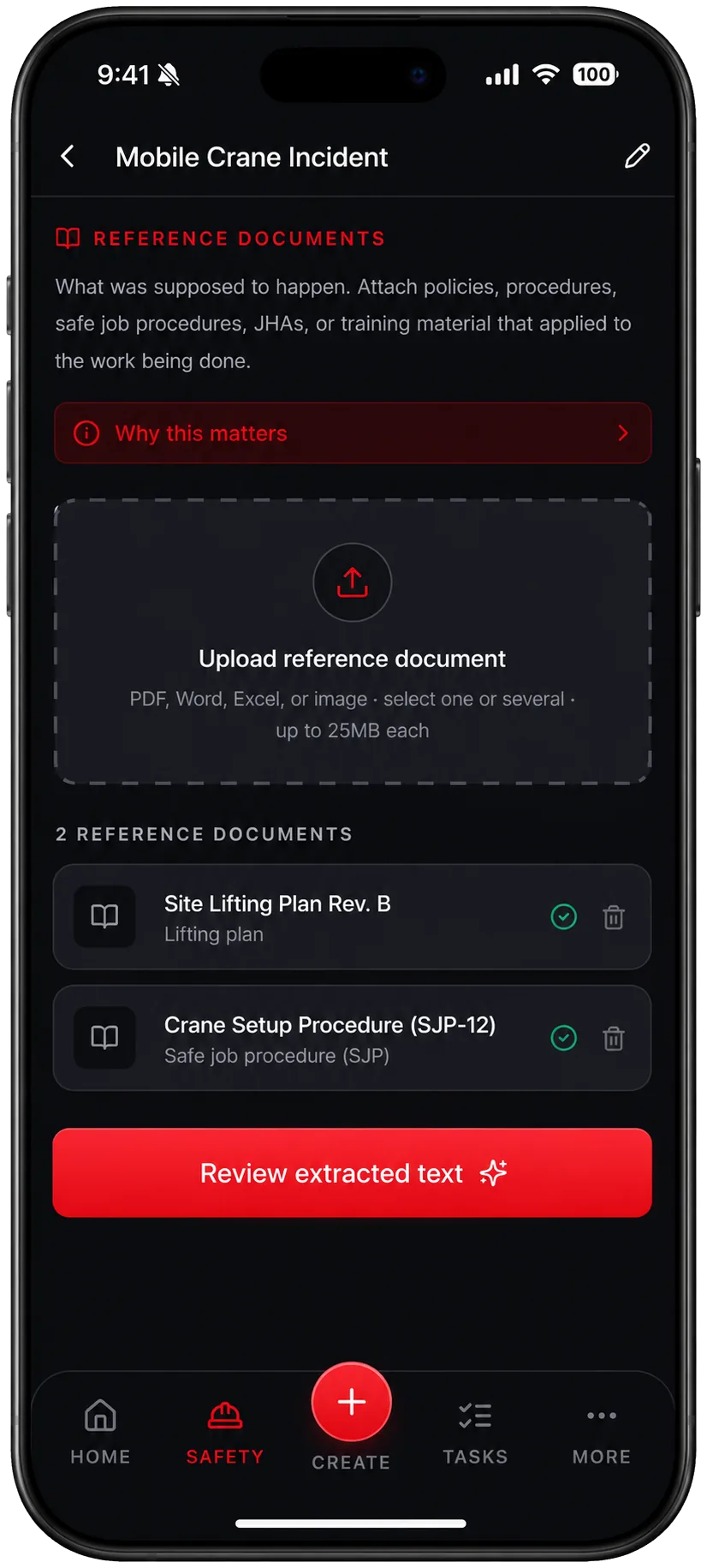
Step 1 · Reference documents
What was supposed to happen.
Attach the policies, safe job procedures, lift plans, and training material that applied to the work. This is what lets the analysis compare the work as planned against the work as done, which is where most real causes live.
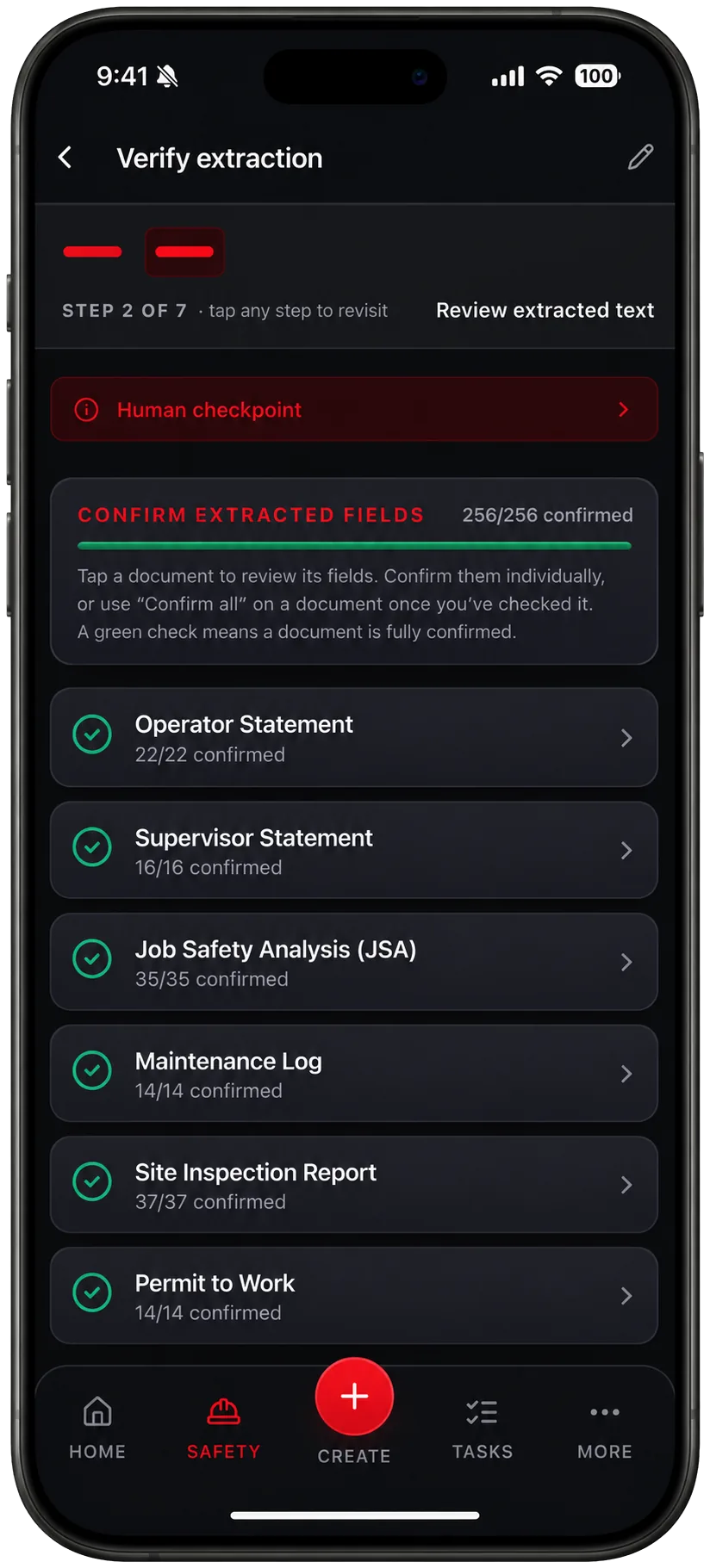
Step 2 · Human checkpoint
You confirm every extracted fact.
The AI reads every document and extracts the facts into structured fields. Then it stops. A human reviews and confirms each field before anything downstream uses it. The analysis is built on facts your team has verified, not on unchecked machine output.
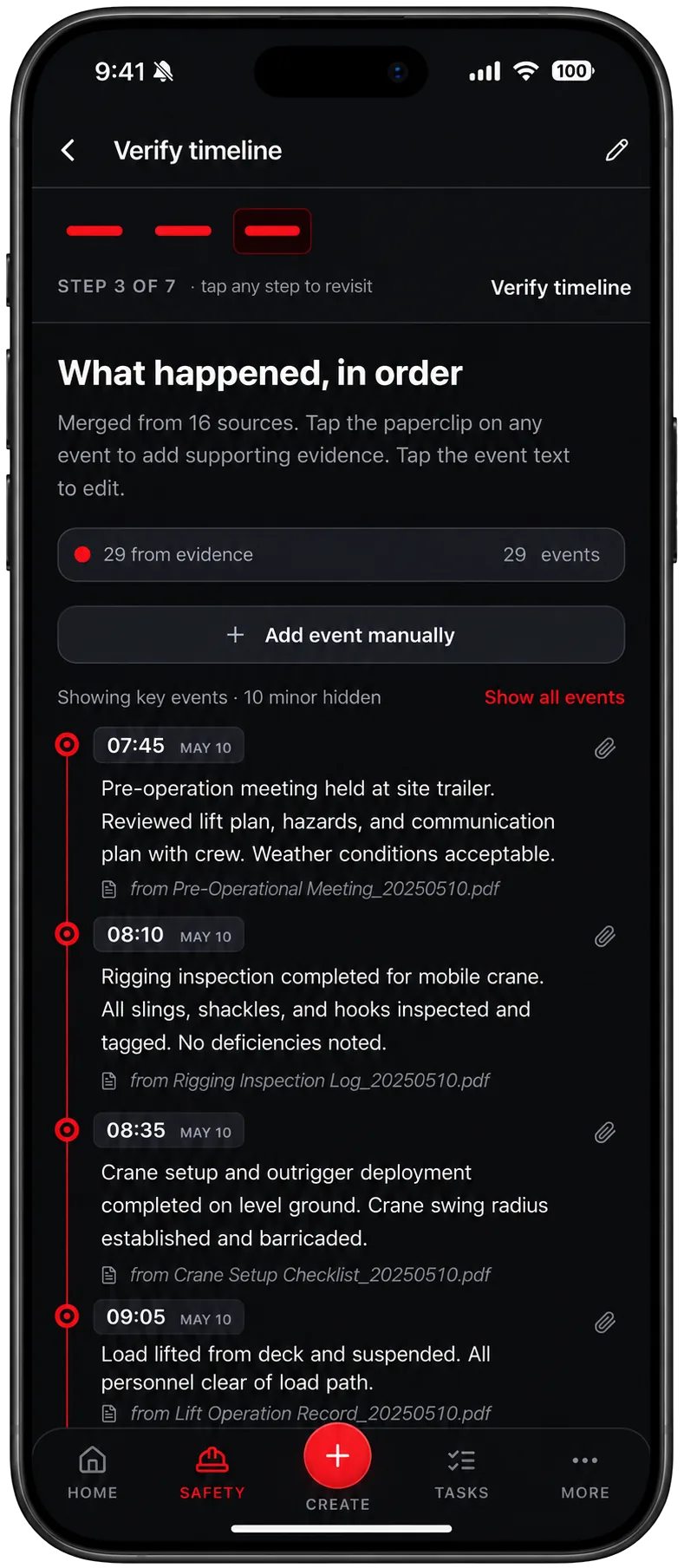
Step 3 · Timeline
What happened, in order, with receipts.
The confirmed evidence is merged into a single timeline. Every event cites the document it came from, minor events can be hidden to keep the story readable, and you can add or edit events and attach supporting evidence to any of them.
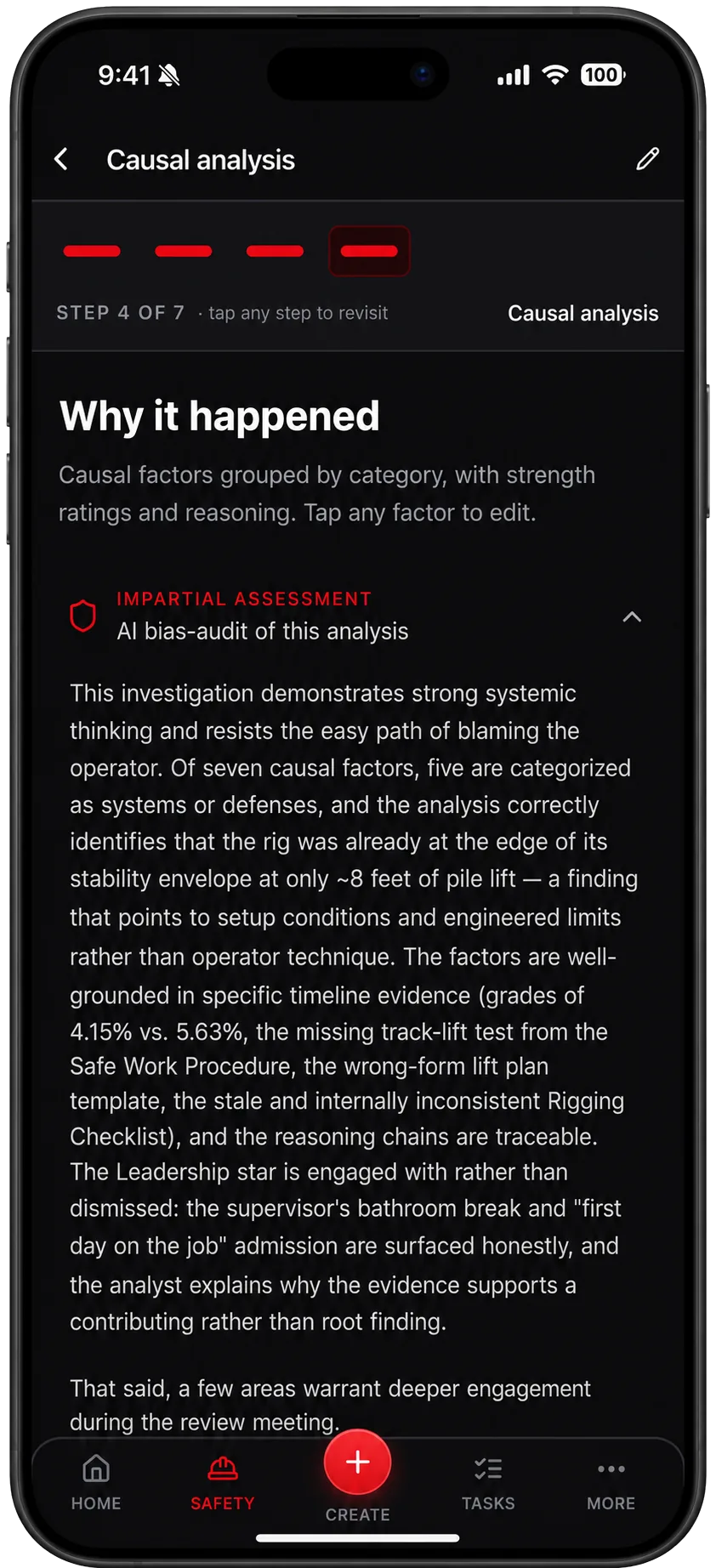
Step 4 · Causal analysis + bias audit
Why it happened, audited for bias.
Causal factors are grouped by category with strength ratings and reasoning chains traceable back to the evidence. Then an independent AI pass audits the whole analysis for hindsight bias, individual blame framing, and premature closure, and you read that assessment before sign-off.
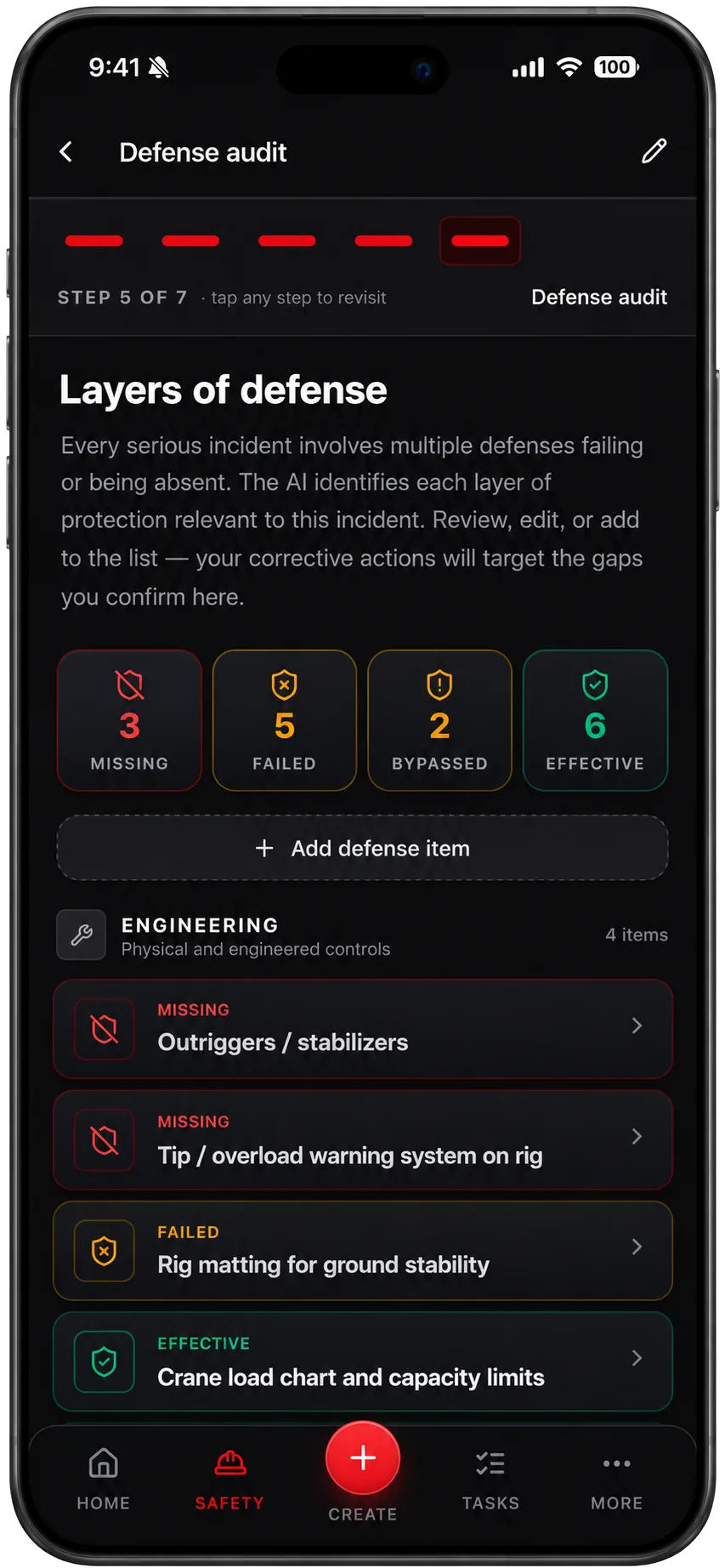
Step 5 · Defense audit
Every layer of protection, examined.
Serious incidents happen when multiple defenses fail or were never there. The Defenses star maps each layer as missing, failed, bypassed, or effective, grouped by engineering, administrative, and behavioural controls, so corrective actions target the actual gaps.
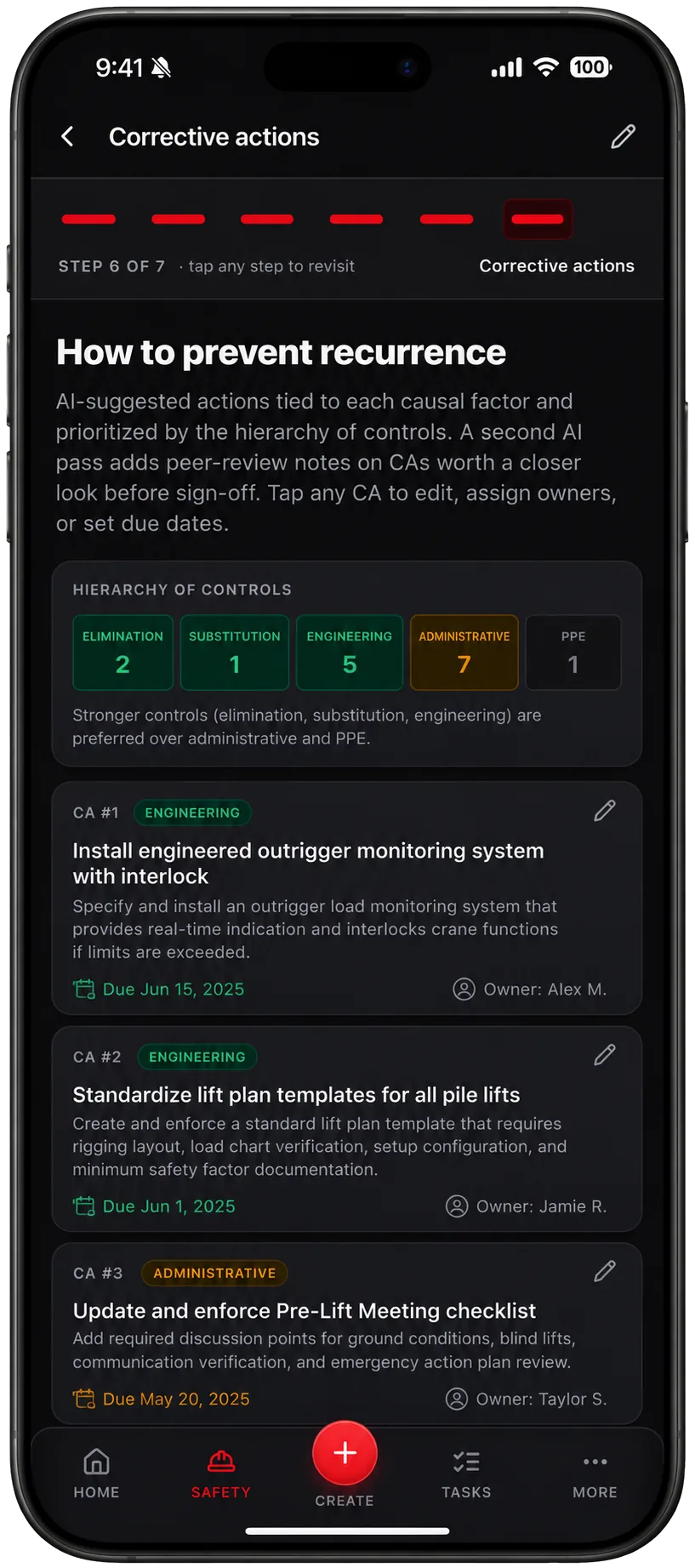
Step 6 · Corrective actions
Actions ranked by the hierarchy of controls.
Suggested corrective actions are tied to each causal factor and prioritized by the hierarchy of controls, favouring elimination, substitution, and engineering over paperwork and PPE. A second AI pass adds peer-review notes on any action worth a closer look, then you assign owners and due dates.
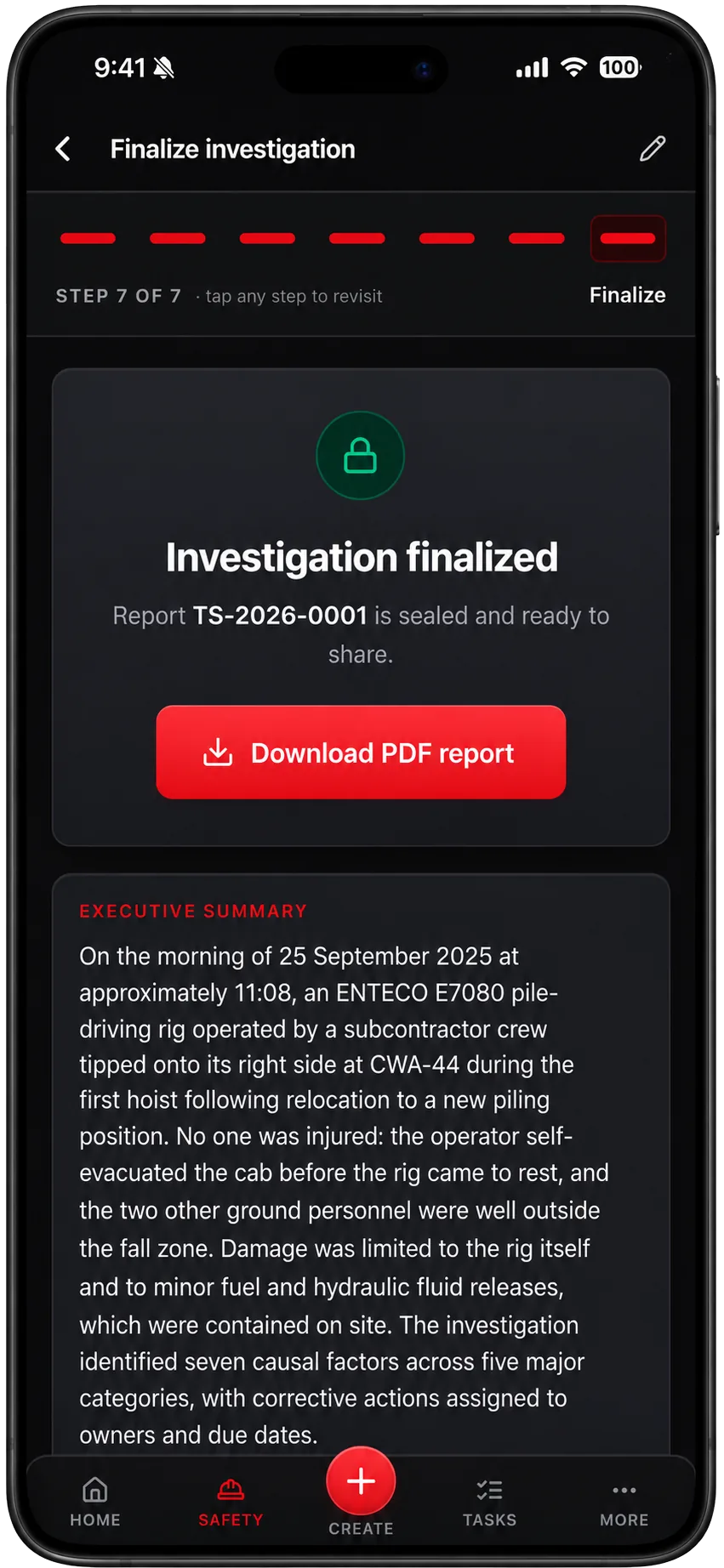
Step 7 · Finalize
A sealed, numbered report. Done.
Finalizing seals the investigation with a report number and generates a professional PDF: executive summary, timeline, causal analysis, defense audit, corrective actions, and the embedded scene photos. Ready for management, the client, or the auditor.
Legacy RCA software vs the TruStar Method
The goal is the same: find the real causes and fix them. The way you get there is not.
Getting started
Legacy RCA
Multi-day certification training before anyone can run an investigation
TruStar Method
A guided seven-step flow any competent supervisor can follow today
Evidence handling
Legacy RCA
Documents filed separately, referenced by hand, easy to lose
TruStar Method
Photographed or uploaded, auto-classified, and embedded in the final report
Timeline
Legacy RCA
Rebuilt manually from notes and memory
TruStar Method
Merged from the evidence, with every event citing its source document
Bias control
Legacy RCA
Depends entirely on the discipline of the analyst
TruStar Method
An independent AI bias audit on every analysis, read before sign-off
Leadership factors
Legacy RCA
Often out of scope, so investigations stop at the worker
TruStar Method
A dedicated Leadership star, weighed equally with every other factor
Corrective actions
Legacy RCA
Free-text actions with no ranking and no follow-through
TruStar Method
Ranked by the hierarchy of controls, peer-reviewed by a second AI pass, with owners and due dates
The report
Legacy RCA
Assembled by hand over days, formatting included
TruStar Method
A sealed, numbered PDF generated the moment you finalize
Cost model
Legacy RCA
Software licenses plus training courses plus consultant hours
TruStar Method
Included in every TruStar Connect plan, with no locked features
Investigations your COR auditor will love.
Incident investigation is a scored element in every COR and SECOR audit. Auditors want to see that incidents were investigated, causes were identified beyond employee error, and corrective actions were assigned, completed, and verified. Every TruStar Connect investigation produces exactly that record: sealed, numbered, and ready to hand over. And because a valid COR is what protects your WCB premium rebate, the quality of your investigations is not just good practice. It is money.
AI root cause analysis, answered.
What is AI root cause analysis?
AI root cause analysis uses artificial intelligence to do the slow parts of an incident investigation: reading every document, extracting the facts, building the timeline, and drafting causal factors with reasoning that traces back to the evidence. In TruStar Connect, the AI never works unsupervised. A human confirms every extracted fact before the analysis uses it, and an independent AI bias audit reviews the finished analysis before sign-off.
What is the TruStar Method?
The TruStar Method is a modern incident investigation framework built around five Stars: People, Conditions, Systems, Leadership, and Defenses. It starts from the position that a reasonable, competent person did what made sense to them in the moment, then examines the physical conditions, the gap between written procedures and actual practice, the organizational signals from leadership, and the layers of defense that failed or were missing. Every analysis also receives an independent AI bias audit.
Does the AI replace the investigator?
No. The AI accelerates the mechanical work: classifying documents, extracting fields, merging a timeline, and drafting causal factors and corrective actions. The investigator confirms every extracted fact at a mandatory human checkpoint, edits the timeline and causal factors, reads the bias audit, and owns the final conclusions. The report is theirs, produced faster.
Do we have to use the TruStar Method, or can we use our own framework?
You pick the analysis framework for each investigation. The TruStar Method is the default, but teams can select the methodology they already know. The guided workflow, AI assistance, evidence handling, corrective action tracking, and sealed PDF report work the same way regardless of the framework chosen.
Does this help with COR incident investigation requirements?
Incident investigation is a scored element in COR and SECOR audits, and auditors look for documented investigations, identified causes, and completed corrective actions. TruStar Connect keeps every investigation, its evidence, and its corrective actions in one place, with sealed numbered reports you can produce on audit day. Certification is always earned by your management system as a whole, but the documentation side stops being the hard part.
Where is our investigation data stored?
All TruStar Connect data is hosted in Canada. Investigations, evidence documents, scene photos, and reports stay in Canadian data residency, which matters to many Canadian employers and their clients.
How long does an investigation take with TruStar Connect?
The evidence capture and AI extraction typically compress days of reading and transcription into the same sitting. Most of the human time goes where it should: confirming facts, reviewing the causal analysis and bias audit, and assigning corrective actions. Teams routinely finalize investigations that used to take a week of report writing in a fraction of the time.
Is there a free trial?
Yes. TruStar Connect has a 14-day free trial with no credit card required, and the full platform is included on every plan, so AI root cause analysis is never a locked add-on.
Run your next investigation the TruStar way.
Start a free 14-day trial of TruStar Connect and run a real investigation with the TruStar Method, or book a walkthrough and we will demonstrate it on a scenario from your industry.
No credit card required. Full platform on every plan.